Posts

ERP: DON’T DIRECTLY UPDATE/DELETE/INSERT Rows in DATABASE
Image
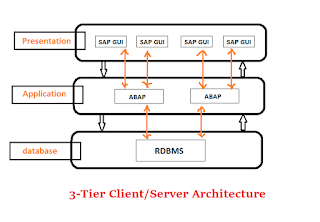
For most of the New ERP aspirants, before getting expertise in CODING/FUNCTIONALITY they should be aware of DO’s and DONTs in ERP. Let’s cover one by one. Whether ERP may be Peoplesoft/SAP/Workday or anything below rule applies. RULE 1: Don’t directly update Database Why we should not do? For this, we need to have an understanding of ERP Architecture. Most of them are three Tier architecture: Presentation Layer/Application Layer and DB Any Transaction Should cross Application server where the LOGIC resides . IF you Miss the logic there will be chances of Data mismatch between tables. Data Consistency is MORE important. If you directly update tables you may MISS other tables. Also, you may end up entering some Junk values for the table. You have to be careful when the tables/fields you update have dependencies or are dependant on, data in on other tables. IF you cross via App server, Logic will take care of everything. IF YOU WANT TO PERFORM DML FOR SOME R...


Peoplesoft PO Delete using DB script

Please use below tables to delete PO using back end or via delete script The system deletes records from these tables when you delete a purchase order: PO_HDR PO_LINE PO_LINE_SHIP PO_LINE_DISTRIB PO_LINE_DIST_NP PO_COMMENTS PO_APPROVAL PO_VAL_ADJ PO_DFLT_TBL PO_ADDR_TBL PO_LN_SHIP_MTCH PO_FRT_SET PO_FRT_CHRG PO_EST_SHIP PO_LN_SHIP_SUT PO_LN_SHIP_SUTD PO_LN_SHIP_EXS PO_LN_SHIP_EXSD PO_LN_DIST_EXS PO_HDR_EXS

Using Unions in DYNAMIC View - Peoplesoft

Image
When using a dynamic view as a prompt PeopleSoft passes the search keys through automatically and appends to he view's SQL. It is not entirely clear sometimes exactly how it is appending to the SQL but it attempts to determine where to add the brackets, sometimes unsuccessfully. This is largely unsuccessful when the dynamic view is a union, it attempts to put brackets in, somewhere. The trick is to wrap the entire union/clause as a kind of subselect: SELECT FIELD_A, FIELD_B, FIELD_C FROM ( SELECT A.FIELD_A, A.FIELD_B, B.FIELD_C FROM TABLE_A A, TABLE B B WHERE B.FIELD_A = A.FIELD_A UNION SELECT C.FIELD_A, C.FIELD_B, C.FIELD_C FROM TABLE C WHERE C.FIELD_A = 'X' AND C.OPRID = %OperatorID ) Note the entire statement is wrapped in brackets making it simple for PeopleSoft to append to the SQL

PeopleSoft Integration Broker support for JSON

Image
Does Oracle/PeopleSoft Integration Broker have support for JSON (JavaScript Object Notation) message format? In PeopleTools 8.40-8.51, Integration Broker does not provide a way via the framework to provide and consume JSON. In PeopleTools 8.52, the REST architecture makes it easier to support formats such as JSON, but still no framework generator/consumer. Since PeopleTools 8.53 and on (8.54, ...) JSON is produced and consumed via Peoplesoft Documents and is seamlessly used within a REST Service.

Cloud... Basic Understanding

Image
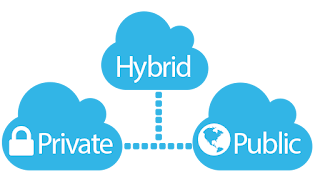
What is the Cloud? Technically speaking the cloud is hosted storage and computing services hosted over the internet. There are basically 3 types of cloud:  public, private and hybrid. The Public Cloud, such as provided by Oracle for example, is storage and processing power shared among many customers.  It is elastic, meaning customers can expand or reduce the amount of storage and computing power as needed.  Typically customers subscribe by paying for what they need on a scheduled basis, much as they do with their utilities such as electricity or water.  The private cloud is typically used when a customer wants the power and benefits of the cloud without sharing the resources with other customers.  It is dedicated to just that customer.  Private cloud may be hosted in the customers own data center or at a provider’s facility and May still be managed by the cloud vendor.  The billing cycle may be similar to public cloud but more expensi...

PeopleSoft Integration Broker - Support for JSON

Image
Does Oracle/PeopleSoft Integration Broker have support for JSON (JavaScript Object Notation) message format? In PeopleTools 8.40-8.51, Integration Broker does not provide a way via the framework to provide and consume JSON. In PeopleTools 8.52, the REST architecture makes it easier to support formats such as JSON, but still no framework generator/consumer. Since PeopleTools 8.53 and on (8.54, ...) JSON is produced and consumed via Peoplesoft Documents and is seamlessly used within a REST Service.

Why PeopleSoft 9.2 - Part 1

With a plethora of new features and technology updates, PeopleSoft 9.2 + PeopleTools 8.54 will certainly bring in a lot of value to your PeopleSoft investment. Let’s discuss top 9.2 advantages one by one (as simple as possible) PeopleSoft Update Manager (PUM):  We have all heard about it but not too sure what it does. PUM, simply put, is a tool that equips you with selective adoption capabilities that PeopleSoft provides. It is a tool that allows the PeopleSoft customers to pick and choose only the updates and bug fixes that they require. It’s almost like shopping online where you can search, analyze, review and select the product that you like, add to your shopping cart and check out. And the exciting part is the frequent delivery of PUM images, which are released every 3 months or so. Now, you do not have to wait for years before bringing in a new feature, enhancement or fixes to your PeopleSoft environment. It’s Simple, It’s flexible and it saves you a ...

Select Right ERP System

Few Tips for Selecting the Right ERP System for a Company Investing in an ERP platform is one of the most critical decisions your business will make. Implementations can take years, and hundreds of thousands of dollars to complete. Critical business functions will likely be supported by this platform for many years to come. You’ll need to train, or hire resources who can support the platform. So it’s critical that you select a system that best fits your business’s needs. But, with so many options available on the market today, it can be challenging to narrow down the field and select the right ERP solution for your business. By considering some of the factors below during your evaluation, you will increase the likelihood that you and your team will select the right ERP platform for your company. ·          Cloud or internal architecture ERP.  The cloud is hot right now, but it may not be the right solution for you. Consider...

Exporting Record data using File Layout Object & Application Engine (Sample Outbound AE Program)

(Sample Outbound AE Program) 1) Create File Layout based on the Record being exported 2) Selecting the desired format; XML, Fixed or CSV. 3)  Create Application Engine Program with one PeopleCode step   4) Single Record import PeopleCode.   Replace FileLayout , Record., GetRow with Desired FLO and Record rem ***************************************************************** rem * Method:               WriteRowSet - CSV File                                  * rem * Description:       Single Record                                  ...

Web Services Security be Used For a Synchronous Service Operation From PeopleSoft to 3rd Party

Image
To send a synchronous service operation from PeopleSoft to 3rd party using Web Services (WS) Security with encryption and a digital signature. Username Token can be a userid with/without password. Userid can be external userid, which is defined on the Node Definition. It can be plain / clear-text meaning without being digitally signed and/or encrypted.   In PT 8.48-8.49, Web Services (WS) Security works with   request   service operations only. Types of service operation                       WS Security              Asynchronous one-way inbound Request Asynchronous one-way outbound Request Synchronous outbound Request only. The response returned cannot have WSS applied Synchronous...

You are not authorized to update the definition XYZ (12,1)

This error is due to Definition Security not being defined correctly. To resolve this error you will need to do the following steps: 1) Find the primary permission list of the user having the error by running the following SQL in your SQL tool. select OPRCLASS from PSOPRDEFN WHERE OPRID = 'whatever user is having the issue' 2) Log into AppDesigner.  Navigate to "Go -> Definition Security".  In "Definition Security" window, navigate to "File -> Open -> Permission List".  Click on the OPRID's primary permission list that we found from above SQL.  Highlight the "All Definitions" on right columns and click on "left arrow".  Navigate to "File -> Save". 3) Clear client cache and try to run the DataMover script again.

How to migrate nVision scopes from one environment to another?

nVision scopes are stored in the table PS_NVS_SCOPE in database. Please copy the PS_NVS_SCOPE table records from the old enviroment to the new environment. Application Designer or Data Mover are the best methods to copy records from one environment to another.

Bootstrap vs User Mode

If you use the access ID that you specified during the database configuration to log on, you log on to Data Mover in “bootstrap mode.” When you start Data Mover in bootstrap mode, the word “BootStrap” appears in the Data Mover status bar. If you use a valid PeopleSoft Operator ID, such as PS for Human Capital Management or VP1 for Financials/Supply Chain Management, you log on in “user mode.” In this mode, no designation appears in the Data Mover status bar.

Could not Create Shared Cache Error

When attempting to access Data Mover to run a script, an error was generated: Could not Create Shared Cache A cache directory, C:\PS\CACHE\ by default, is needed and should have Write Permission for PeopleTools. Action:  Create the cache directory and grant Write Permission for the user that runs Data Mover.

Datamover Script: Export and Import PeopleSoft Data

Image
There are quite a few techniques available in PeopleSoft to export and import the table from the database, one of which is Datamover. Data Mover Export set log C:\EXPORT.log;                                                  — Place where log file is maintained set output C:\JOBtabledmp.dat;                             — This is the place where the exported data is stored. export JOB;                                    ...

Peoplesoft Application Engine: Application Library

Image
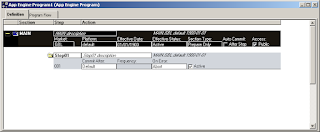
 Most Application Engine programs are defined to be executable. An executable program has a main entry point in its definition: the Section MAIN. This defines the entry point so whatever method we choose to invoke the program, such as command line or Process Scheduler, can initiate the program. However, in some cases, we may want a program to only contain a collection, or "library," of common routines (in the form of "callable" Sections) that we do not want to run as a standalone program. When sections are defined as "Public," other programs can call the Sections, or routines, that exist in the "library" at runtime. Because this type of Program is not designed to run as a stand-alone program, it does not require the MAIN Section, or initial entry point. Setting the Application Library option renames or removes any existing MAIN Section. Note: Application Libraries are the appropriate spot to store a collection of shared Application Engine pro...

Best For Career- Peoplesoft/Workdays or any other ERP

Image
I know lot of articles, discussion around Pros and Cons of Cloud and Legacy - features, functionalities, upgrade cost, UI, etc - Nevertheless, this all from the vendors perspective for the clients who would be using these applications. As per my understanding for all business, Scenarios cannot be same, every business is unique, and so would be the solution. There would be not any ideal solution, it all depends on what's the business of the client and lot other things to be considered for selecting the right application. As a Technical Consultant it will be always confusing to choose the right product for the right Carrier. Even I used ask myself these questions and other people also, I do have these much years of experience in Peoplesoft, is it good to move to Workday or Sucessfactors?  Learning is good; it's an never ending/on- going process, but one cannot learn each and everything. Try to understand basic functionalities of the Business Process which is going to be same...

Can Microsoft Office Communicator be Enabled for Chat in Peoplesoft?

Image
No.  Microsoft Office Communicator with Multichannel Framework up to current PeopleTools, ie. PT8.53 is not supported. In PT8.51, in MCF you can enable instant messaging for : GTALK SAMETIME XMPP YAHOO In PT8.52, PT8.53 and PT8.54, you can enable instant messaging for : GTALK SAMETIME XMPP YAHOO MSN

Sending Multiple attachment using MCF Send mail method

Below is the sample code to send multiple attachment in mail using MCF Send() mail method. Local any &FromURL = "record://PV_ATT_DB_SRV/" ; Local string &FILENAME; Local Rowset &rwln1 = CreateRowset(Record.PV_ATTACHMENTS); Local SQL &Sql1 = CreateSQL( "select attachsysfilename from PS_PV_ATTACHMENTS a,ps_SPF_RESUME_ATT b where a.scm_attach_id=b.scm_attach_id and b.person_id=:1" , "000000000000025" , &FILENAME); While &Sql1.Fetch(&FILENAME) &attach = create PT_MCF_MAIL:MCFBodyPart(); Local string &ToFile = "C:/user/" | &FILENAME; Local any &errorCode = GetAttachment(&FromURL, &FILENAME, &ToFile); If &i = 1 Then &multiattach = CreateArray(&attach); &multiattach [&i] = &attach; Else &multiattach [&i] = &attach; End-If; &multiattach [&i].SetAttachmentContent(&ToFile, %FilePath_Absolute, &FILENAME,...

Peoplesoft Navigation SQL

Below is the smart SQL to find out the Navigation for the given Component. (This Works only on Oracle DB) Enter the Component Name in the below SQL SELECT DISTINCT rtrim(reverse (sys_connect_by_path(reverse (portal_label), ' > ')), ' > ') path FROM SYSADM.PSPRSMDEFN WHERE portal_name = 'EMPLOYEE'   AND portal_prntobjname = 'PORTAL_ROOT_OBJECT' START WITH portal_uri_seg2 = ‘<COMPONENT Name>’ CONNECT BY   PRIOR portal_prntobjname = portal_objname