Posts

Delete Recurrences in Peoplesoft

A recurrence is an application designer definition , so instead of deleting directly from the PeopleTools tables, you can migrate the object with an action of delete. To remove it from within the same environment, copy to file with a delete flag and re-import the project from file with the delete flag (only re-import the recurrences - not everything in the project). Below are related tables for recurrence: 1. PS_PRCSRECUR 2. PS_PRCSRECUREXEMPT 3. PS_PRCSRECURLANG 4. PS_PRCSRECURDATE  
Generating Component Interface APIs

Image
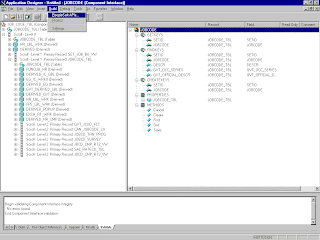
Build Peoplesoft JAVA API: 1.        Open the PeopleSoft Application Designer. 2.        From the PeopleSoft Application Designer, open a component interface. 3.         Click the right pane and select  PeopleSoft APIs  from the Build menu. ( Before using your component interface, you must apply security to it and test it.) 4.       The Build PeopleSoft API Bindings dialog box prompts you for the types of bindings to create. Ensure you deselect COM Type Library Build, because you are creating Java files. To create APIs for a specific component interface or interfaces, click None. This clears the selected APIs, so you can select the appropriate APIs for your component interface. These APIs begin with the name of your component interface. In addition to the APIs for the selected component interface, you also must generate the ...

Java API - Unable to get the Component Interface

Performing the GET call on the  component interface using a Java client fails, despite all security being set correctly. In this case you would be able to do GET  using the CI tester in three tier, which indicates that security is not the issue.   The problem here was that the package structure of the API classes got changed from PeopleSoft.Generated.CompInfc to myNewpackage.Test.peoplesoft.   If you change the package structure of the API classes in anyway, e.g., you create different folder names other than what is generated during the API build, the Session object which controls all access, security, and errorLoging, will be unable to find the CI interfaces. The underlying JOA layer expects the following package structure:"PeopleSoft.Generated". The PeopleSoft Package structure should not be altered in either the directory structure or through the use of the package statement in the java classes.

Error when trying to access to the CI initially (for example, when opening the CI Tester in Application Designer) .

a) Log into PIA (PeopleSoft Internet Architecture) via the browser, and navigate to PeopleTools > Security > Permission Lists.   b) Open the appropriate permission list.   c) Click on the Component Interface tab and enter the CI name.   d) Then click on the Edit link and add access to the CI's methods. Then click Ok.   e) Save the change on the permission list page.   f)  Test access to the CI again. In some cases you may need to delete the appropriate cache for the change to take effect.  

Peoplesoft SFTP

Image
Transferring a file using SFTP to specified target location: (Thanks to Jawahar who helped me in this article) A lot has been mentioned about sFTP support in PT 8.51. Below gives clear idea on SFTP. Are there any specific pre-requirements for using file transfer protocols? Yes. Though FTP can be used directly by giving the URL as a string to the peoplecode method, other protocols (ftps, sftp, http and https) require the URL to be passed as a URL identifier only. When an URL identifier is created, URL properties link on the page gets enabled. Users need to provide the URL properties specific to the protocol they are using on this "URL properties" page. The URL properties differ based on the protocol choosen. Once URL Identifier is ready, it can be used in any of the file attachment peoplecode methods just like the existing way.   What are the authentication methods supported for sftp? Password and Public Key authentication are supported. ...

Consume a 3rd party web services in PeopleTools 8.50 +

Image
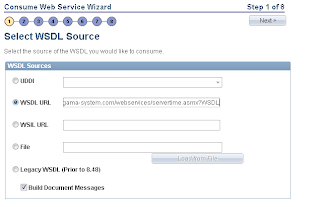
Consume a 3rd party web service: Navigate to Main Menu -> PeopleTools -> Integration Broker -> Web Serives -> Consume Webservices There are various Delivered steps involved: 1) Input the 3rd Party WSDL: (Here we tested with : http://www.gama-system.com/webservices/servertime.asmx?WSDL ) (Ensure that you uncheck Build Document Messages if u r going to use non rowset messages) Refer:  Build Document Messages 2) Click on Next and Check related WSDL Service 3) Select Appropriate Service with relevant Port  4) Click on Service Operation we are going to use 5) Click on Next 6) Click on Next 7) click on Finish 8) Click on View Consumed Service or Navigate to Main Menu -> PeopleTools -> Integration Broker ->Integration Setup -> Services 9) Click on Service Operation (GETDATE) 10) Provide Appropriate Security (Permission List) by clicking Service Operation Security Use Below Code to invoke t...

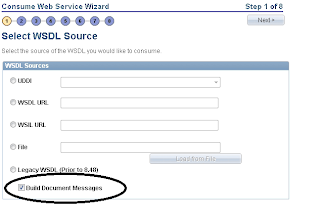
Build Document Messages while Consuming Webservice

Image
For any tools version greater than 8.50, while consuming web services (in first page) we can see one Option ‘Build Document Messages’. This option is checked by Default.  Use this to build document type messages for the consumed service. Clear the box to build nonrowset-based messages for the consumed service.